
Simpit Launcher
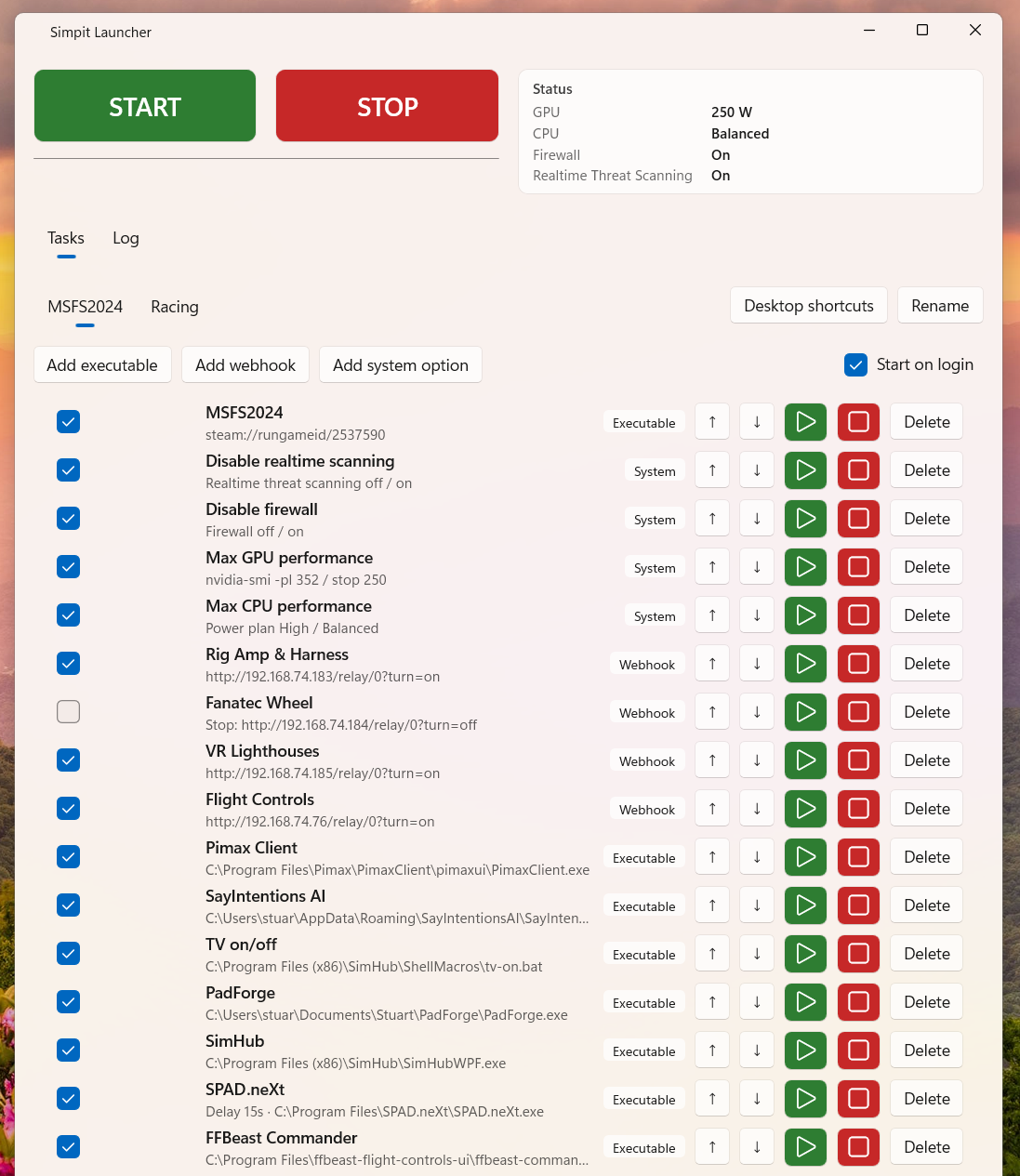
Windows desktop app for sim-pit setups: start and stop an ordered checklist of apps, webhooks, Shelly relays, COM commands, and system tweaks per profile (default: Flight and Racing). Replace ad-hoc batch files with one START / STOP, tray actions, or the command line. Free to download.
Features
- Ordered START / STOP task lists per profile
- Per-task delay (seconds) so steps can run in the background while the list continues
- Profiles with their own task lists and display names (Rename)
- Live status panel: GPU power limit, CPU plan, firewall, realtime threat scanning
- Progress + run log; full history on the Log tab
- Desktop Start/Stop shortcuts for the active profile
- System tray: hide on close/minimize; Start, Stop, Exit from the tray menu
- Start on login (optional)
- Command-line start/stop for scripts and shortcuts
Task types
- Executable — launch
.exe,.bat,.cmd, or URIs (e.g.steam://...); kill or force-kill on stop - Webhook — HTTP GET start/stop URLs
- Shelly — turn a Shelly relay on/off by IP
- COM command — write start/stop text to a serial port
- System — built-in tweaks such as firewall, Defender realtime scanning, USB power saving, max CPU/GPU performance
Requirements
- Windows 10/11 x64