
ToF Stylus Saver
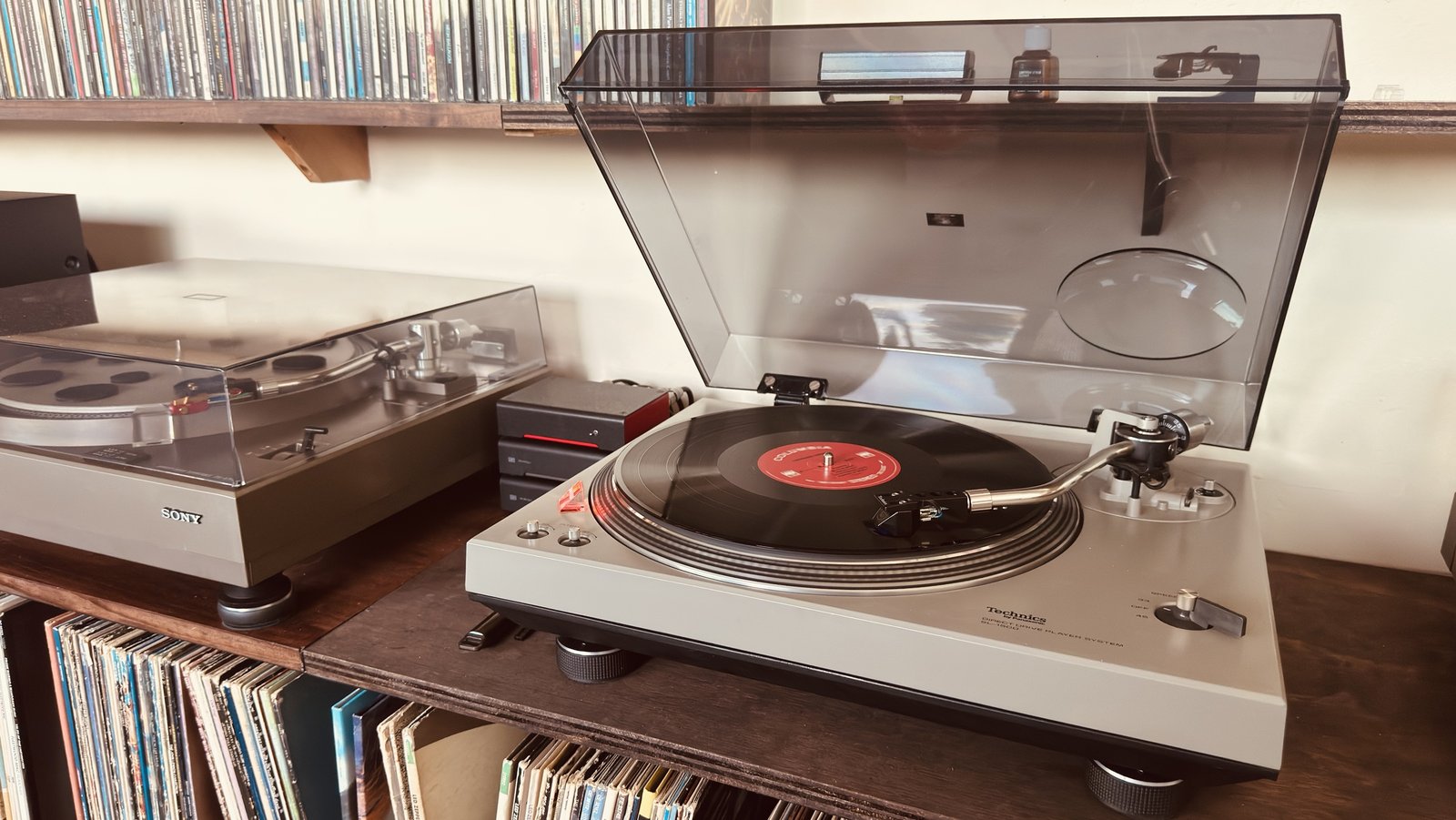
This is an updated version of the Stylus Saver. That one watches how much power the turntable draws. This one uses a distance sensor instead: a VL53L0X time-of-flight sensor sees the tonearm arrive at the centre of the record, then cuts power through a Shelly relay.
Mains power is involved, so please work safely and don’t connect the relay to anything you aren’t sure about.
How it works
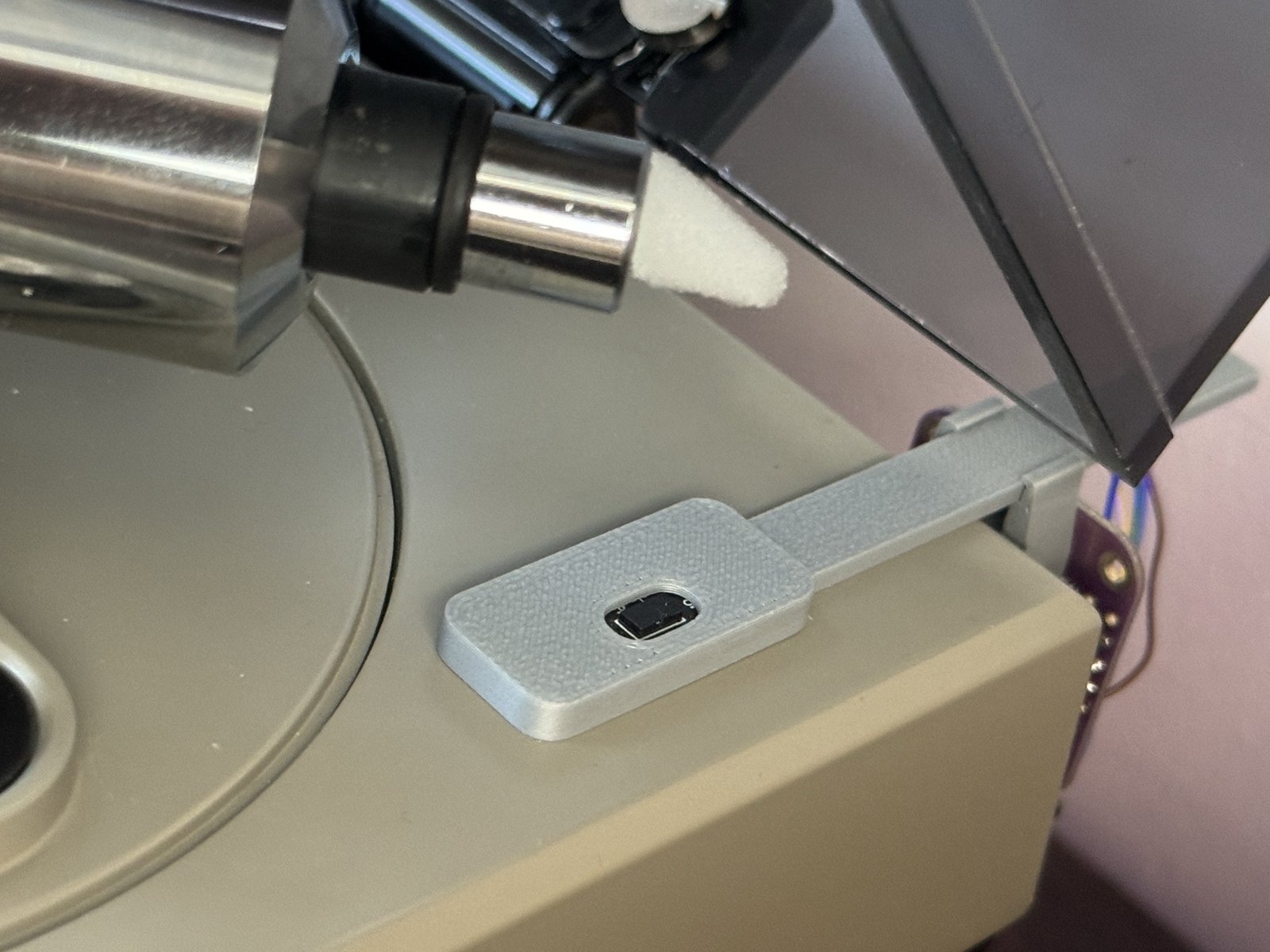
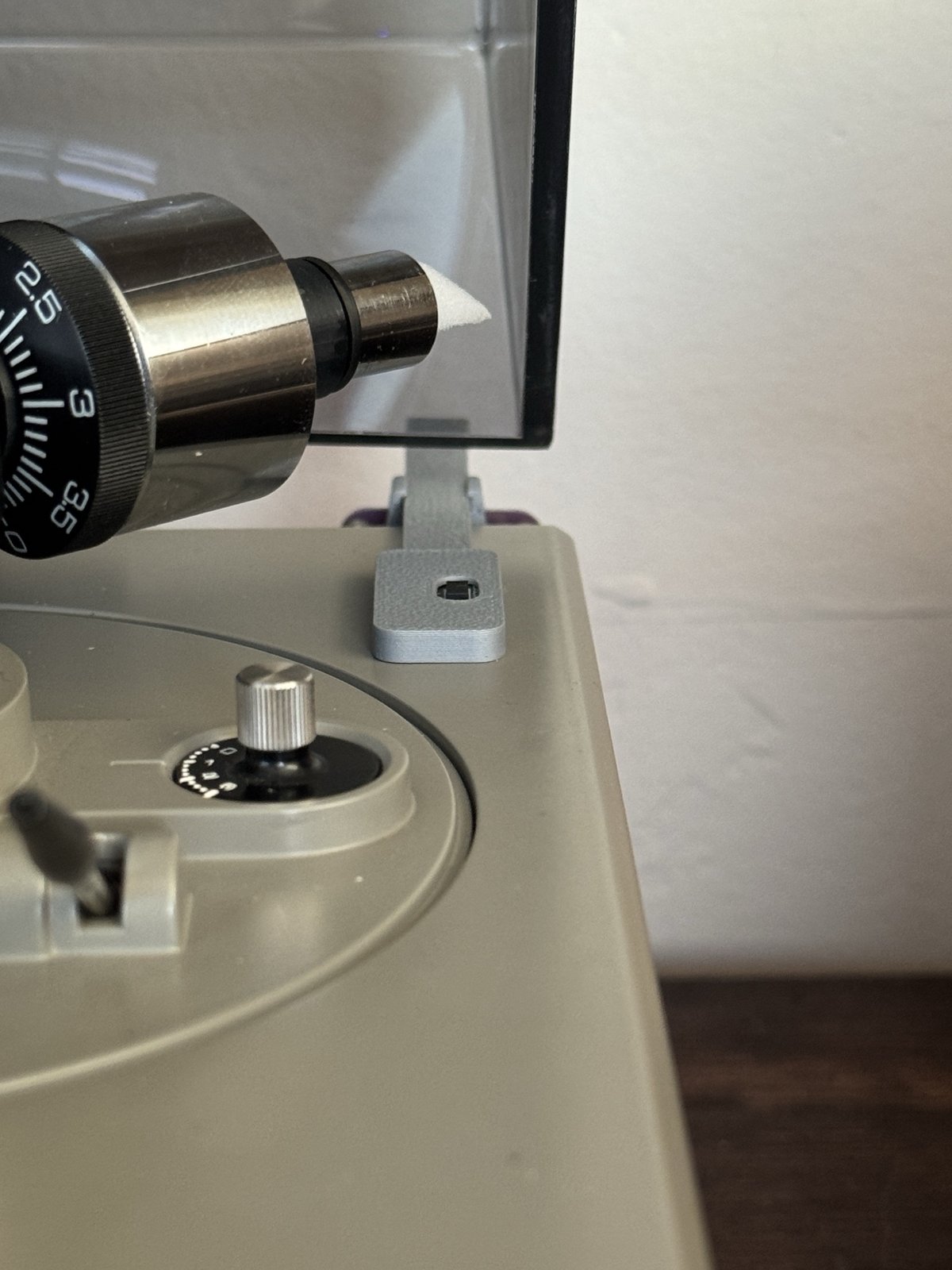
The sensor measures the distance to whatever is in front of it. When the tonearm passes over it, the firmware works like this:
- Turning off: once the reading stays under 40 mm for 8 readings in a row, the relay is switched off and the turntable stops.
- Turning back on: once the reading stays over 50 mm for 10 readings in a row, the relay is switched back on.
- Smoothing: readings are averaged, and the sensor is read about every 40 ms.
The gap between 40 and 50 mm stops the relay from chattering when the arm sits close to the threshold. The board’s LED lights whenever the reading is under 40 mm, with no filtering, so you can see the sensor working.
Hardware
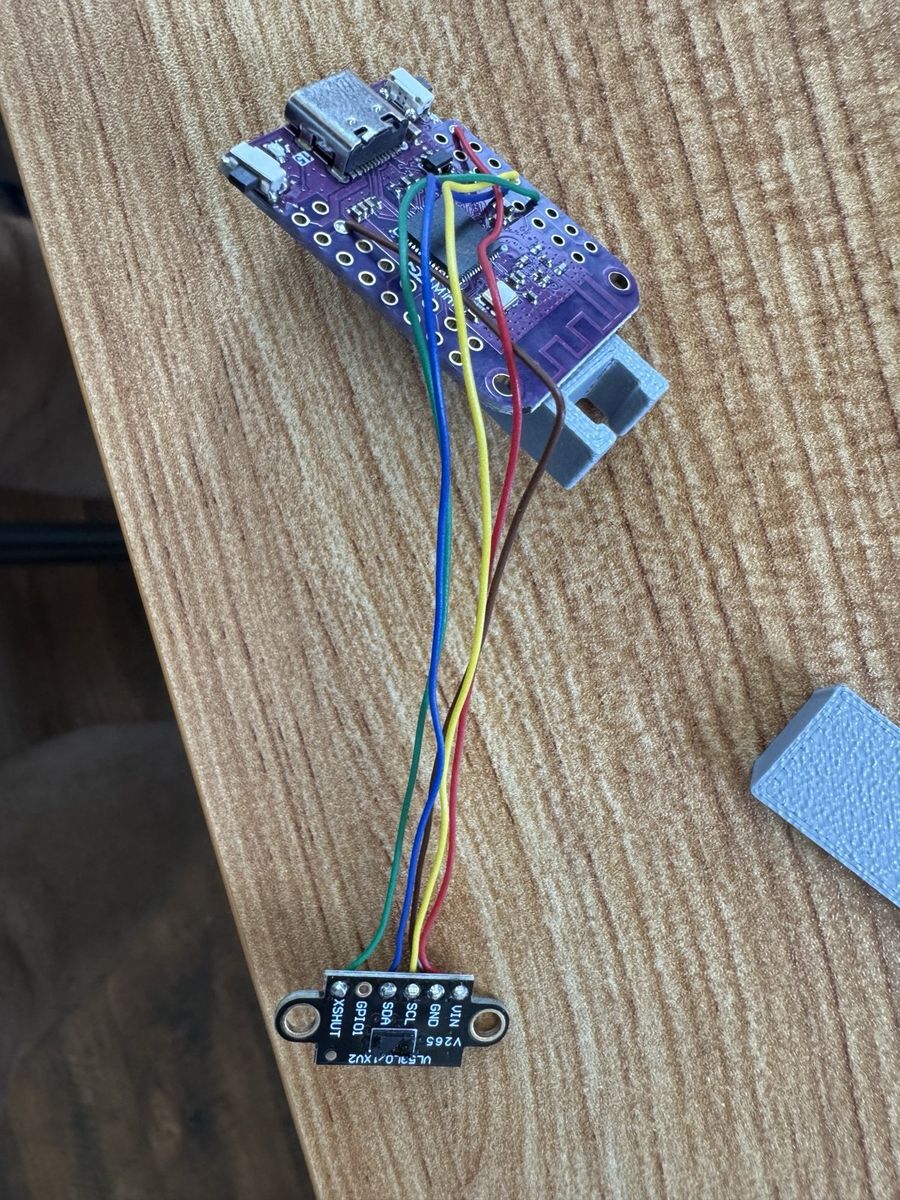
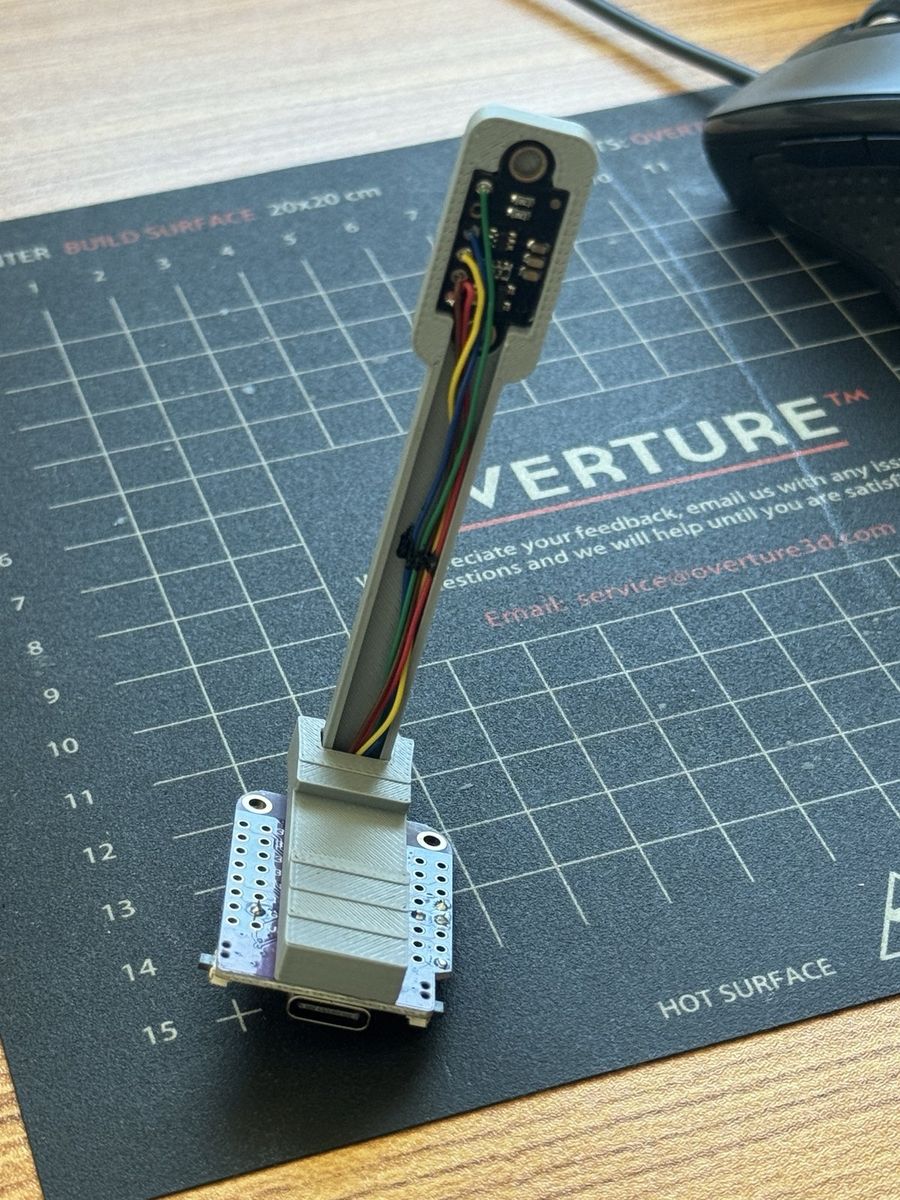
- A LOLIN (Wemos) S2 Mini
- A Pololu VL53L0X time-of-flight sensor. I’d recommend this one over the cheaper VL6180X modules, which had problems with crosstalk from the cover glass.
- A Shelly relay (Gen1 or Gen2) for switching the turntable
- A small 3D-printed bracket to hold the sensor by the tonearm
Wiring
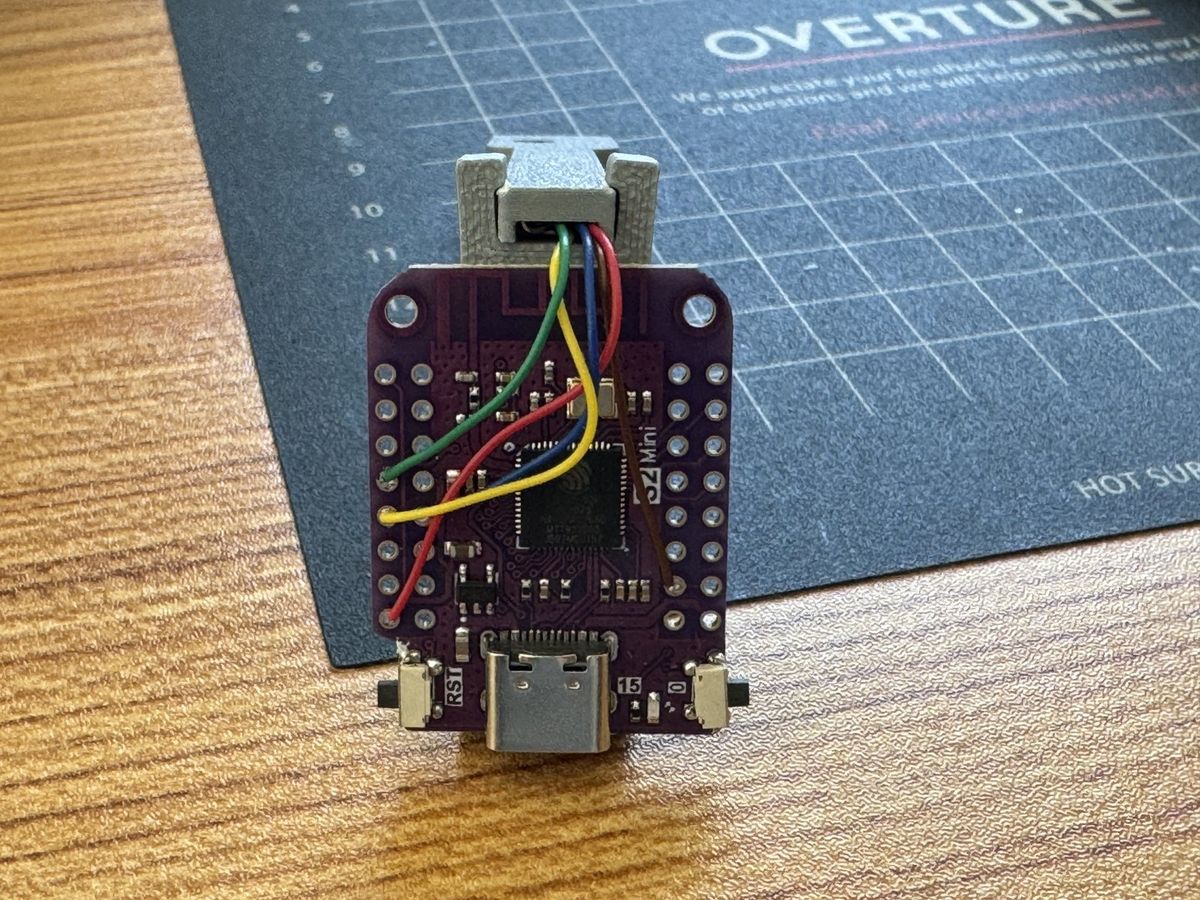
| VL53L0X | S2 Mini |
|---|---|
| VIN / VCC | 3V3 |
| GND | GND |
| SDA | GPIO8 |
| SCL | GPIO9 |
| XSHUT | GPIO7 |
Software
The firmware is an Arduino sketch for the S2 Mini. It needs the Pololu VL53L0X library, which you can install from the Arduino Library Manager or with arduino-cli.
Select the board LOLIN S2 Mini (esp32:esp32:lolin_s2_mini) with USB CDC on boot enabled, which is the default. Then compile and upload:
arduino-cli compile -b esp32:esp32:lolin_s2_mini arduino/vl53l0x_pololu
arduino-cli upload -p COMxx -b esp32:esp32:lolin_s2_mini arduino/vl53l0x_pololu
arduino-cli monitor -p COMxx -c baudrate=115200
Copy secrets.h.example to secrets.h and fill in your 2.4 GHz Wi-Fi details and the Shelly’s IP address (SHELLY_HOST). Keep secrets.h out of version control.
Downloads
- vl53l0x_pololu.ino: the S2 Mini firmware
- secrets.h.example: copy this to
secrets.hand fill in your values
Calibration
Sensors vary, so calibrate each one once. Hold a flat object exactly 40 mm from the sensor, then send c over the serial monitor. The offset is saved to the board. If you want to start again, send z to clear it. After a full flash erase, calibrate again.
Serial commands
| Key | Action |
|---|---|
c |
Calibrate the offset at 40 mm |
z |
Clear the offset |
1 / 0 |
Relay on / off |
Shelly script: run-time and alerts
The Stylus Saver’s Shelly script runs alongside the sensor on the same Shelly. It tracks how long the turntable has been running, saves that total to a virtual number on the Shelly, and sends Pushover alerts. It doesn’t use the sensor at all.
It works by reading the Shelly’s power measurement once a second. Any reading above the threshold counts as running time.
Setup
- Create a free Pushover account and an application. Copy your user key and the application’s API token.
- In the Shelly UI, add two virtual Number components with IDs 200 and 201. The script stores total run-time in 200 and current power in 201.
- Paste the script into the Shelly’s script editor, replace the placeholders in
CONFIGwith your own keys, and setdevice_nameto your turntable’s name. - Save and start the script.
Settings
| Setting | Default | What it does |
|---|---|---|
user_key |
placeholder | Your Pushover user key |
api_token |
placeholder | Your Pushover application token |
device_name |
SL-1500 |
The name used in the alerts |
title |
Power Monitor |
The Pushover message title |
power_threshold |
1 |
Watts. Above this, the turntable counts as running |
notificationDelay |
60 * 25 |
Seconds of continuous running before the “running too long” warning (25 minutes) |
powerOffDelay |
60 * 30 |
Seconds of continuous running before the Shelly switches the turntable off (30 minutes) |
intervalHours |
10 |
Send a total run-time update every this many hours of running |
What you’ll get
- On startup: a message with the device name and the total run-time so far.
- Every
intervalHoursof running: a message with the total run-time. - After
notificationDelay: a warning that the device has been running too long. - After
powerOffDelay: the Shelly switches the turntable off and sends a “powered off” message.
Run-time is saved to Number 200 once an hour of running and whenever the turntable stops, so a short restart doesn’t lose much.
Script
let CONFIG = {
  // Config your Pushover parameters here
  user_key: "YOUR_PUSHOVER_USER_KEY",
  api_token: "YOUR_PUSHOVER_APP_TOKEN",
  device_name: "SL-1500", // Configurable device label
  title: "Power Monitor",

  power_threshold: 1, // Watts
  notificationDelay: 60 * 25,
  powerOffDelay: 60 * 30,
  pm_component_id: 0,   // Usually 0 for single-channel PMs
  intervalHours: 10     // Notify every 10 hours of active use
};

// Auto-generate alert messages based on device_name
CONFIG.warningMessage = CONFIG.device_name + " running too long";
CONFIG.powerMessage = CONFIG.device_name + " powered off";

let consecutive_seconds = 0;
let alert_sent = false;
let alert2_sent = false;

// Buffer accumulated seconds in RAM to avoid frequent flash writes
let pending_runtime_seconds = 0;
let runtime_interval_seconds = 0;
let TEN_HOURS_IN_SECONDS = CONFIG.intervalHours * 3600;

// Local tracking of total runtime
let current_total_hours = 0;

function sendPushoverNotification(message) {
  print("Sending notification to Pushover...");

  Shelly.call(
    "HTTP.POST", {
      url: "https://api.pushover.net/1/messages.json",
      header: {
        "Content-Type": "application/json"
      },
      body: JSON.stringify({
        token: CONFIG.api_token,
        user: CONFIG.user_key,
        title: CONFIG.title,
        message: message
      }),
      ssl_ca: "*"
    },
    function (response, error_code, error_message) {
      if (error_code === 0) {
        print("Pushover notification sent successfully!");
      } else {
        print("Failed to send notification. Code: " + JSON.stringify(error_code) + " Msg: " + error_message);
      }
    }
  );
}

// Helper function to write to Number components using RPC calls
function updateVirtualNumber(id, val) {
  Shelly.call("Number.Set", { id: id, value: val });
}

// Helper function to flush accumulated runtime to Virtual:200
function commitRuntimeToVirtual() {
  if (pending_runtime_seconds === 0) return;

  let hoursToAdd = pending_runtime_seconds / 3600;
  current_total_hours += hoursToAdd;

  updateVirtualNumber(200, current_total_hours);
  pending_runtime_seconds = 0;
  print("Flushed runtime to Virtual Component. New total: " + current_total_hours.toFixed(2) + " hrs");
}

// 1. Read initial value from Number:200 and startup
Shelly.call("Number.GetStatus", { id: 200 }, function (result, error_code, error_message) {
  if (error_code === 0 && result && result.value !== null) {
    current_total_hours = result.value;
  } else {
    current_total_hours = 0;
  }

  sendPushoverNotification(CONFIG.device_name + ". Total runtime: " + current_total_hours.toFixed(2) + " hours.");

  // 2. Start timer after initial fetch succeeds
  Timer.set(1000, true, function () {

    let switchStatus = Shelly.getComponentStatus("switch:0");
    let current_power = (switchStatus && switchStatus.apower) ? switchStatus.apower : 0;

    // Update Number:201 with active power
    updateVirtualNumber(201, current_power);

    if (current_power > CONFIG.power_threshold) {
      if (consecutive_seconds % 60 === 0) {
        print("consecutive_seconds", consecutive_seconds, CONFIG.notificationDelay);
      }

      consecutive_seconds++;
      runtime_interval_seconds++;
      pending_runtime_seconds++;

      // Write to Virtual:200 only once every 3,600 active seconds (1 hour)
      if (pending_runtime_seconds >= 3600) {
        commitRuntimeToVirtual();
      }

      // Check if 10 hours of active use have elapsed
      if (runtime_interval_seconds >= TEN_HOURS_IN_SECONDS) {
        commitRuntimeToVirtual();
        runtime_interval_seconds = 0;
        sendPushoverNotification(CONFIG.device_name + ": " + CONFIG.intervalHours + " hours of use reached. Total runtime: " + current_total_hours.toFixed(2) + " hours.");
      }

      // Safety threshold alerts
      if (consecutive_seconds >= CONFIG.notificationDelay && !alert_sent) {
        sendPushoverNotification(CONFIG.warningMessage);
        print("sending warning");
        alert_sent = true;
      }
      if (consecutive_seconds >= CONFIG.powerOffDelay && !alert2_sent) {
        commitRuntimeToVirtual();
        sendPushoverNotification(CONFIG.powerMessage);
        print("power off");
        Shelly.call("Switch.Set", { id: 0, on: false });
        alert2_sent = true;
      }
    } else {
      // When device powers off/drops below threshold, save any remaining unsaved minutes
      if (pending_runtime_seconds > 0) {
        commitRuntimeToVirtual();
      }

      // Reset safety monitors
      if (consecutive_seconds > 0 || alert_sent) {
        print("Resetting monitors");
        consecutive_seconds = 0;
        alert_sent = false;
        alert2_sent = false;
      }
    }
  });
});
Using it with the sensor
The sensor sketch and this script both control the same relay (switch 0). Be careful about running both:
- The timer turns the turntable off after 30 minutes of continuous running.
- The sensor turns it back on whenever the tonearm is away from the sensor for a moment. That can undo the timer’s switch-off.
If you use both, decide which one should win. For a simple setup, use the sensor on its own and check run-time on the Shelly dashboard.
Was this page useful?